GUIDE · SUB-ADMIN

Sub-admin guide

Your job on game night: record the mahjongs at your table in two taps.

1

What a sub-admin does

The admin made you a sub-admin: on game night you record the mahjongs at your table so she doesn't have to go table by table. That's the only thing that changes; everything else you see like any player.

Money, players, calendar and settings stay with the admin.

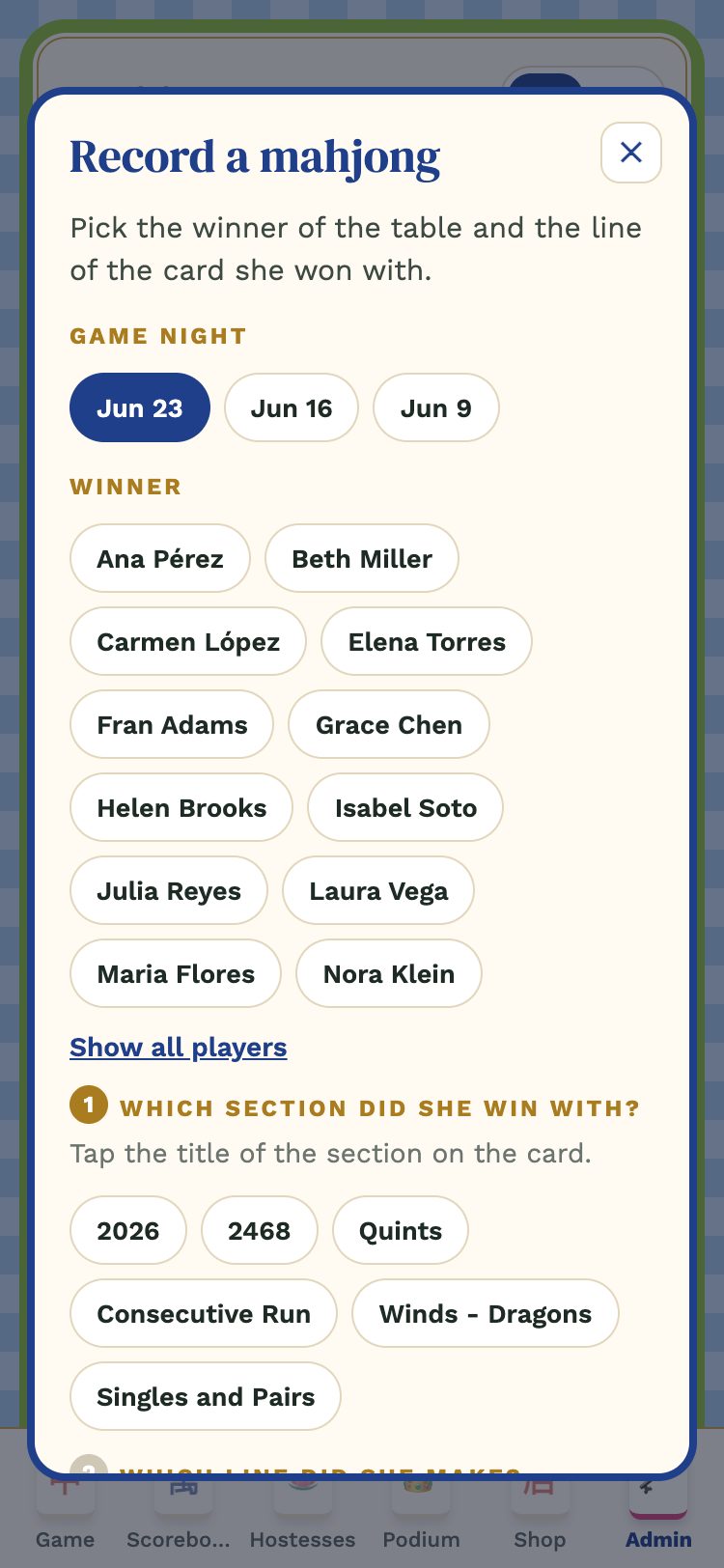
The Record a mahjong window
2

Record a mahjong

When someone at your table makes mahjong, open the last tab (your sub-admin panel) and tap Record a mahjong:

  • Night: usually tonight (already selected).
  • Winner: tap her name. Tonight's confirmed players come first; Show all players opens the whole list, and Another player ▾ changes her once chosen.
  • ① Which section did she win with? Tap the title of the section on the card (for example 2468 or Consecutive Run).
  • ② Which line did she make? Tap the line with its points. Points and X or C come from the card.

A green summary, You are about to record:, lets you check it. Tap Save mahjong. The scoreboard updates on everyone's phone.

No signal: if the house has no reception, the mahjong is saved on your phone and sent by itself when the signal returns.
3

Fix a mistake

Below the window, Recorded in [month] lists the mahjongs by night: tap a date to open it. If you picked the wrong player or line, tap the square ✕ next to it to remove it and record it again. You can also delete from the "Mahjongs of the month" list in your panel.

Everything goes to the admin's activity log with your name, so any doubt is settled in a moment.

Sub-admin panel
Sub-admin panel
4

Your panel and the green "?"

Your panel only has Record a mahjong, the mahjongs of the month and, below, the Sub-admin guide button that opens this page. Every screen has a ? button that explains that place.

Questions?

Ask your club admin, or write to support@mahtables.com.

GUÍA · SUBADMINISTRADORA

Guía de la subadministradora

Tu tarea la noche de juego: anotar los mahjongs de tu mesa en dos toques.

1

Qué hace una subadministradora

La administradora te nombró subadministradora: en la noche de juego tú anotas los mahjongs de tu mesa para que no tenga que ir mesa por mesa. Es lo único que cambia; todo lo demás lo ves igual que cualquier jugadora.

El dinero, las jugadoras, el calendario y los ajustes siguen siendo de la administradora.

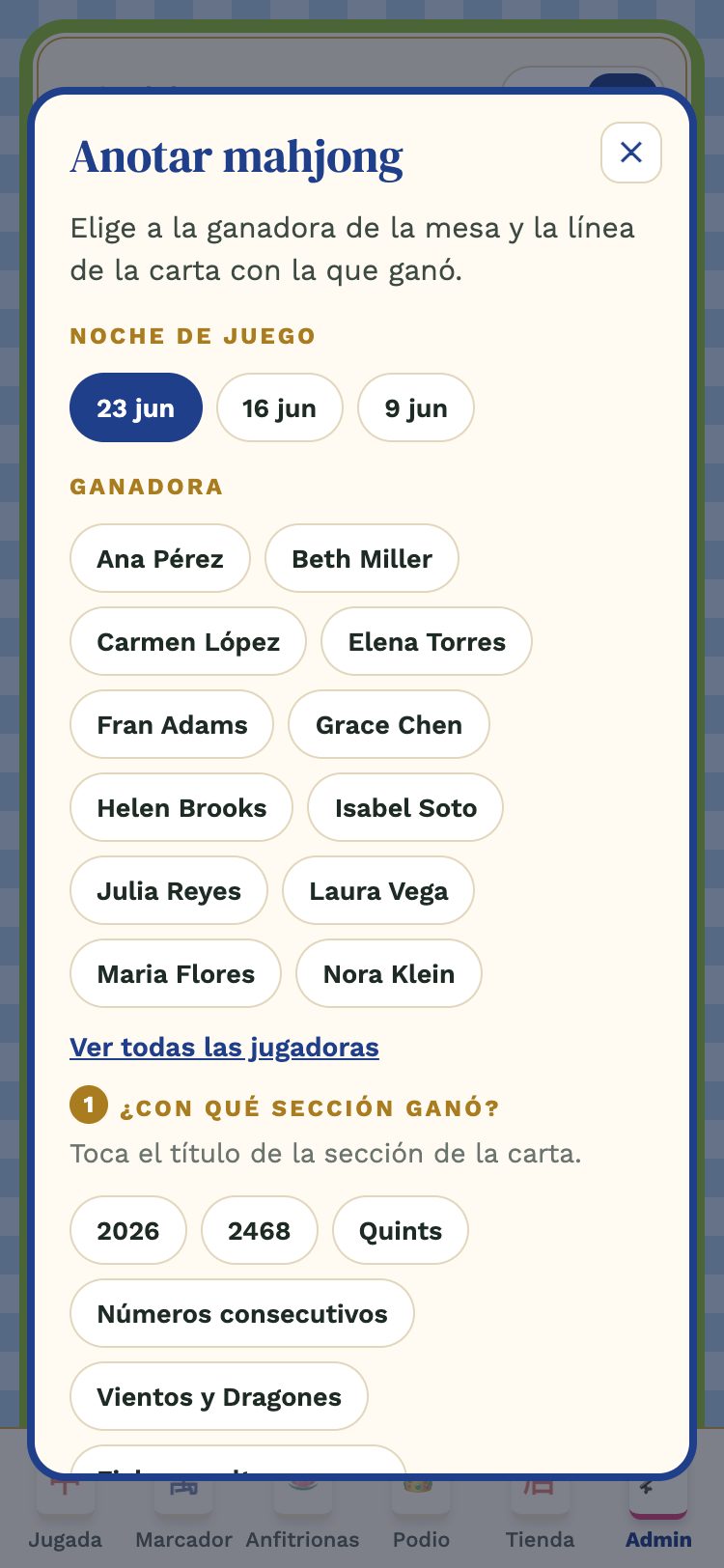
Ventana Anotar mahjong
2

Registrar un mahjong

Cuando alguien de tu mesa hace mahjong, abre la última pestaña (tu panel de subadministradora) y toca Anotar mahjong:

  • Noche: normalmente la de hoy (ya viene elegida).
  • Ganadora: toca su nombre. Primero salen las confirmadas de esa noche; Ver todas las jugadoras abre la lista completa y Otra jugadora ▾ la cambia una vez elegida.
  • ① ¿Con qué sección ganó? Toca el título de la sección de la carta (por ejemplo 2468 o Consecutive Run).
  • ② ¿Qué línea hizo? Toca la línea con sus puntos. Los puntos y si es X o C los pone la carta.

Un resumen verde, Vas a anotar:, te deja revisarlo. Toca Guardar mahjong. El marcador se actualiza en el teléfono de todas.

Sin señal: si en la casa no hay red, el mahjong se guarda en tu teléfono y se manda solo cuando vuelva la señal.
3

Corregir

Abajo de la ventana, Anotados en [mes] muestra los mahjongs por noche: toca una fecha para abrirla. Si te equivocaste de jugadora o de línea, toca el botón cuadrado ✕ de ese renglón para quitarlo y vuélvelo a anotar. También puedes borrar desde la lista "Mahjongs del mes" de tu panel.

Todo queda en la bitácora de la administradora con tu nombre, así que cualquier duda se aclara en un momento.

Panel de subadministradora
4

Tu panel y los "?" verdes

Tu panel solo tiene Anotar mahjong, los mahjongs del mes y, abajo, el botón Guía de la subadministradora que abre esta página. En cada pantalla hay un botón ? que explica ese lugar.

¿Dudas?

Pregúntale a la administradora de tu club o escríbenos a support@mahtables.com.